


 In January I have already reported about 4 different AirPlaying apps which I tested on Windows 8: AirParrot, Airfoil, AirServer and Reflector app.
Last, but not least, I tested Shairport4w 1.0.0.23, a small app for AirPlaying music from your iPad, iPhone or iPod touch to the loud-speakers of your Windows PC. In contrast to Airfoil, Shairport4w does not cost anything! It turns your Windows PC’s loud-speakers into an AirPlay device.
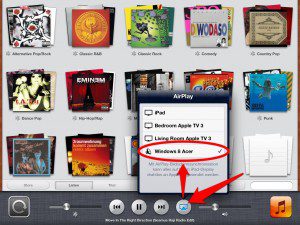
Shairport4w 1.0.0.23 is running perfectly on my Acer Aspire 1810T with Windows 8 Pro and Windows 8 Media Center installed.
The Installation of Shairport4w is very simple, just download the zip-file, unpack it and run the exe-file as administrator.

After that, Shairport4w is running as a service and you can open it and make some property changes:
Setting a password for AirPlay (I do not mind), Giving your Windows PC an alternate name or choosing to autostart Shairport4w every time you boot your Windows PC. There are advanced options, too. But to me, it looks a little bit to complicated: Just let it be… 😉
Stay tuned! 😉

2 Comments
Pingback: Bluetooth/WLAN => Cinch
Pingback: AirPlay: Shairport4w 1.0.5.1 Released – Running On Windows 8 | miApple.me